

If your phone number, address, or a private photo appears in Google Search, it can feel invasive, even dangerous. Google’s Personal Content Removal Form was built to fix that.
This guide breaks down when to use it, what types of content qualify, and how to fill out the form properly so your request doesn’t get denied.
What Is Google’s Personal Content Removal Form?
Google offers a dedicated form for removing certain types of personally identifiable information (PII) and sensitive content from search results. It doesn’t remove the content from the source site, but it can strip it out of Google’s results, which means most people will never find it.
For a deeper dive into all your options for removing Google search results, check out our complete guide on How to Delete Google Search Results and our guide on all of Google’s Content Removal Tools.
What You Can Remove Using the Form
Google’s content policies cover a range of personal data and imagery. Here’s what qualifies:

Personal Information
- Home address
- Phone number
- Email address
- Government ID numbers
- Financial records
- Medical documents
- Login credentials
- Signatures or ID images
Sensitive or Exploitative Content
- Nude or explicit photos (shared without consent)
- Deepfakes or fake pornography
- Fake content linking you to sex work
- Images of minors in any sexual or explicit context
Exploitative Sites
- Content on sites that charge money for removal
- Content tied to doxxing or blackmail
Content Involving People Under 18
- Nude or explicit images of minors (illegal in most countries)
- Photos or videos of a minor in any sexualized context
- Personal content about a minor posted without consent
- Any image of a minor where removal is requested by a parent or guardian
How to Submit a Request
Here’s how to access the form and submit a request correctly:
Access the Personal Content Removal Form
You’ll be asked to:
- Choose the type of content you’re reporting
- Identify whether it’s you, your child, or someone you’re authorized to represent
- Enter specific URLs
- Provide search terms that trigger the result
- Upload screenshots as proof
- Explain the context (this matters more than people think)
Special Cases and What to Expect
If the Content Contains Nudity or Explicit Material

Google allows removal if the imagery is:
- Shared without your consent
- Falsely attributed to you (deepfake)
- Involves someone under 18
- Links your name to adult content
You’ll be asked:
- If you ever gave consent
- If the image is real or fabricated
- If you want Google to automatically remove similar images in the future
This part of the form is used often in revenge porn cases, even when the content is hosted outside the U.S.
If the Content Involves a Minor
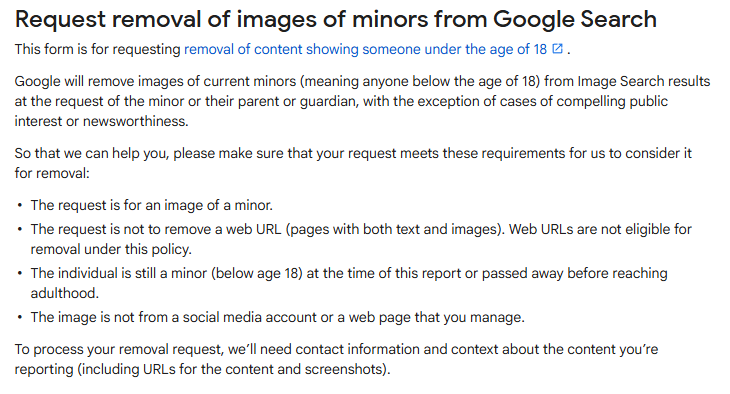
If the person is under 18, Google may remove the image even if it’s not sexually explicit, especially if the child is identifiable.
They’ll ask:
- Is the person still under 18?
- Are you the parent or guardian?
- Is the image hosted on a site you control? (They won’t remove it if you posted it)
In CSAM cases (child sexual abuse material), Google may also report the content to the National Center for Missing and Exploited Children (NCMEC).
If the Site Charges You to Remove It

This applies to “pay-for-removal” websites. Google defines exploitative practices as:
- Charging individuals to take down personal content
- Requesting payment via third-party agencies
They’ll ask:
- Did the site demand payment?
- Do you have screenshots or proof of this request?
You can upload evidence with your form submission.
What Happens After You Submit
Once you submit, here’s what to expect:
- Review time: Usually within a few days
- Decision email: Google will notify you of approval or denial
- Result: If approved, the URL will be removed from search results for your name or image, but the content will still exist on the original site
- Appeals: You can re-submit or appeal if denied
Tip: If you’re logged into your Google account while submitting, you’ll get status updates. For anonymous reports, submit in incognito mode.
What If Google Denies Your Request?
If your request is denied, you still have options:
Try a Legal Removal
If the content is defamatory, harassing, or violates local laws, you can submit a Legal Removal Request.
Contact the Site Owner
Even if Google won’t help, the site itself might. Look for contact pages or use WHOIS data.
Suppress It in Google Search
Use SEO and online reputation management strategies to bury the negative content. Publish positive content on sites like:
- Crunchbase
- Medium
- Your own website
When to Work with a Removal Expert
For complex cases, especially those involving:
- Deepfakes
- Mugshots
- Doxxing
- Sextortion
- Blackmail
A professional content removal service can help. We’ve handled thousands of Google removals and know how to escalate tough cases. If you’re unsure what to do next, we’ll guide you through it.